Troubleshooting IX With a BGP Session Routing Issue
When a BGPBorder Gateway Protocol (BGP) is a standardized routing protocol designed to exchange route and reachability information among autonomous systems (AS) on the internet.
session on Internet Exchange (IX) is experiencing a routing issue, step through these troubleshooting actions.
Tip
Megaport operates a public, web-accessible MegaIX Looking Glass for peers and network operators to investigate the current routing state. You can query the primary and redundant route servers for live BGP data here: MegaIX Looking Glass.
Troubleshooting actions
| Action | Steps |
|---|---|
| Verify the BGP configuration | Check the ASN, BGP IP address, and subnet mask. |
| Verify access to TCP port 179 | BGP neighbors establish a TCP session using TCP port 179.
|
| Check the BGP neighbor state | When BGP is configured with a neighbor IP address (route servers, bilateral peers, or both), it goes through several stages before it reaches the Established state. The BGP Neighbor States are Idle, Connect, Active, OpenSent, OpenConfirm, and Established.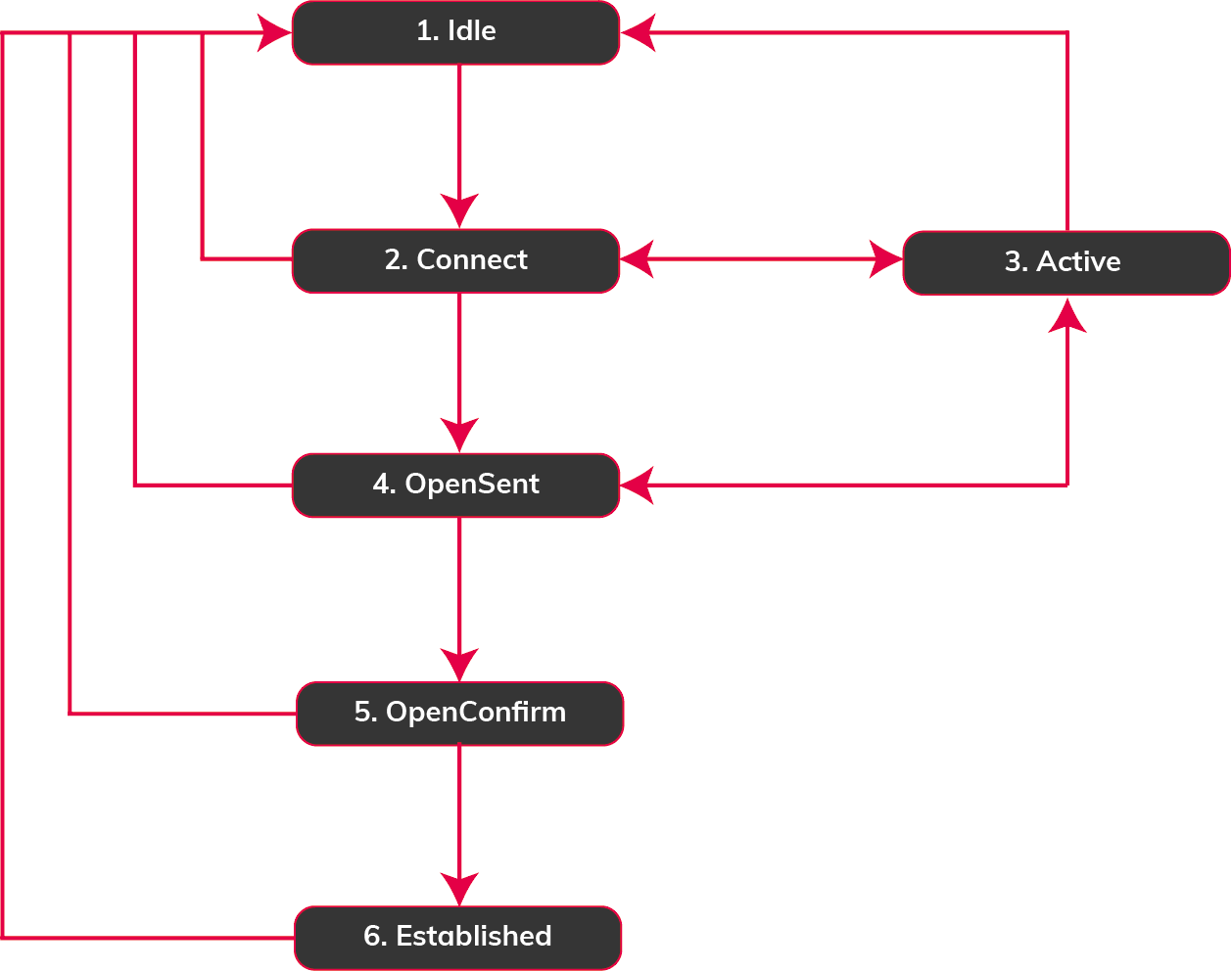 |
| Check the BGP message type | BGP packets use these message types:
|
| Verify the MD5Sometimes known as an MD5 hash or BGP key. The message-digest (MD5) algorithm is a widely used cryptographic function producing a string of 32 hexadecimal digits. This is used as a password or key between routers exchanging BGP information. authentication |
|
| Run connectivity tests |
|
| Find error conditions in BGP logs | The BGP protocol sends a notification message when it detects an error with the BGP session such as an expiring hold timer, a change to neighbor capabilities, or a request to reset a BGP session. When an error is detected, the BGP session is closed. For example, enter show log %BGP-xxxxx. For more information, see Internet Exchange Overview. |
Next steps
If the troubleshooting actions do not resolve your issue, contact support. Before contacting support for assistance, collect the following information:
- All troubleshooting steps taken, in detail. For example, if you place loopbacks, note their location and direction.
- Note the date, time, and time zone in which the issue started.
- Is the BGP session down?
- Is the BGP session flapping? For example, does the peering establish, then drop, re-establish and then drop? Try to pinpoint where the problem might be in the network using ping.
- Is there a BGP routing issue?
Note
For more information about when a field service technician is needed onsite at the data center, see Customer Field Services.
Collect essential troubleshooting data
BGP configuration information
- Interface settings, including VLANA partitioned and isolated computer network at the data link layer (OSI Layer 2) on a single physical interface (for example, a Port) used to subdivide a network. LAN is an abbreviation of local area network.
number - BGP IP address and subnet mask
- BGP ASN
- BGP network addresses to be advertised
- BGP neighbor IP address and subnet mask
- BGP neighbor ASN
- BGP neighbor network addresses to be received
- BGP authentication between BGP peers
- BGP route filtering and manipulation (if applicable)
BGP command output and packet capture information
- Examine the BGP neighbor table and BGP state using the show IP BGP summary command
- Examine the BGP neighbor details using the show IP BGP neighbors command
- Logs that show BGP-related messages (output from the show log %BGP-xxxxx command)
- BGP routing table entries that have BGP routing issues (output from the show IP BGP command)
- BGP advertised routes (output from the show IP BGP neighbors <neighbor-ip-address> advertised-routes command)
- BGP received routes (output from the show IP BGP neighbors <neighbor-ip-address> routes command)
- Routing table (output from the show IP route <ip-address> command) at both ends
- TracerouteA diagnostic tool that examines how data moves through the internet to determine if a destination is reachable.
logs between source and destination host - Packet capture logs, if possible (file size can be up to 10 M)